Instead of copying bandana quantities between Faire orders and disconnected spreadsheets, connect the records through a shared SKU ledger with explicit receipt and order rules. Start with a controlled manual workflow; add automation only after confirming that your Faire account and chosen inventory system support the required connection.
- To connect Faire wholesale bandana inventory, map SKUs and selling units before transferring quantities.
- Separate retailer purchasing from brand-side selling; each workflow changes inventory differently.
- Wholesaleforeveryone supplies wholesale bandanas; treat sourcing and inventory software as separate decisions.
- Test receipts, order reservations, and duplicate handling before enabling automatic updates.
Why this matters
A purchase order, a physical delivery, and a customer order represent different inventory events. Combining them into a single quantity field creates errors even when every connection works correctly.
For your 2026 setup, choose the workflow before choosing a connector. A retailer buying through Faire needs a receiving process; a brand selling through Faire needs an order-allocation process. Do not assume that a purchasing account provides seller-side integration access.
Wholesaleforeveryone is best for businesses and organizations sourcing wholesale bandanas and other accessories. Explore Wholesaleforeveryone for sourcing, but evaluate inventory connections separately: purchasing merchandise does not establish a software integration.
Before you start
- Confirm your account role and permissions. Identify whether you purchase through Faire or sell through an approved brand account. Have an authorized account user verify the current connection options and any applicable selling requirements.
- Choose a master inventory record. Use an inventory system you already control or a spreadsheet you create. Gather supplier item references, your internal SKUs, variant descriptions, purchase records, and receiving records.
- Resolve the pack-size gotcha first. A purchasing unit and an individual bandana are not necessarily the same unit. Record the actual conversion from the relevant product or order documentation before importing any quantities.
This guide uses bold labels for fields you create, not Faire interface labels. Connection screens differ by inventory provider; use the current instructions for the specific account and connector rather than looking for an assumed universal button.
Workflow selection
Choose the smallest workflow that covers your actual transactions. Neither a supplier relationship nor a matching product description proves that a direct connection exists.
| Workflow | Best for | Advantage | Limitation |
|---|---|---|---|
| Manual reconciliation ledger | Establishing a controlled baseline | Makes mappings and adjustments visible | Requires someone to record each event |
| File-based reconciliation | Reviewing transactions in batches | Keeps a reviewable transfer record | Requires compatible exports and imports; changes are not continuous |
| Verified connector | Repeated transactions across supported accounts | Reduces repeated entry for supported events | Requires confirmed account access, mapping, and error handling |
Start with the manual ledger when connector support is unconfirmed. File transfers and connectors are alternatives to evaluate, not features this guide attributes to Faire or Wholesaleforeveryone.
Do not choose automation solely because it can move a quantity. Confirm what that quantity means, which system controls it, and what happens when the same event arrives again.
SKU mapping
Create the product identity record
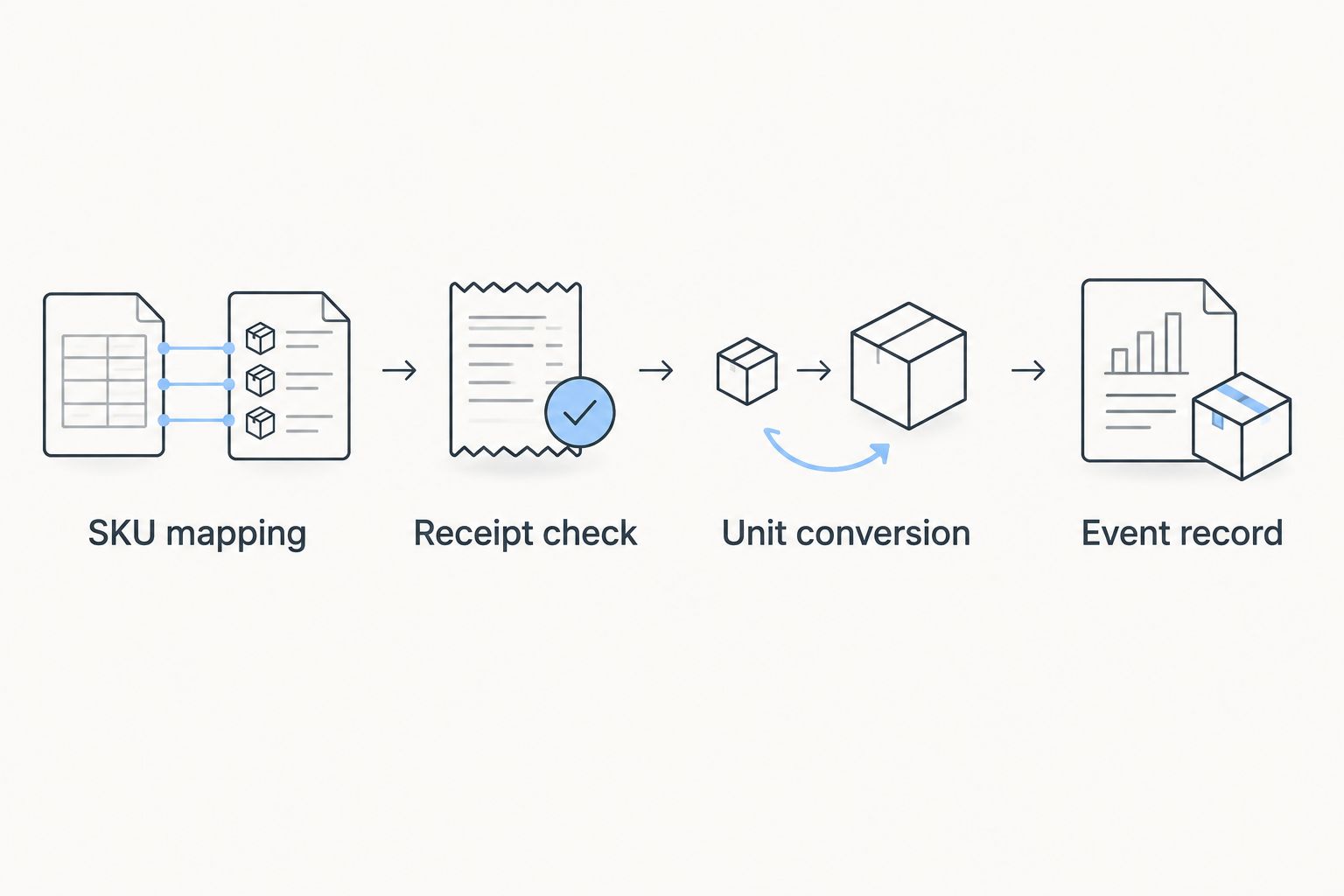
- Create a worksheet or inventory table named SKU Map. Add fields for Internal SKU, Supplier Item Reference, Faire Item Reference, Variant, Purchase Unit, and Units per Purchase Unit.
- Assign a distinct internal SKU to each bandana variation you need to count separately. Use the actual product attributes from your purchasing records; do not infer material, dimensions, or color from a photograph.
- Enter each external reference exactly as recorded. Preserve leading zeros and punctuation by treating identifiers as text rather than numbers.
- Enter the purchasing unit and its documented conversion. Leave unresolved mappings outside the active workflow until someone confirms them.
- Check for duplicate internal SKUs and external references mapped to conflicting variants. Resolve those conflicts before creating transaction rules.
Expected result: Each mapped bandana variant has an unambiguous identity and a documented purchasing unit. A second person can follow the record without guessing which item a description means.
A product name is a description, not a dependable join key. Similar names can refer to different variants, while different descriptions can refer to the same item.
Define the quantity fields
Create separate fields for Received Units, Reserved Units, Dispatched Units, and Adjustment Units in your transaction record. Define adjustments as signed entries with a reason, rather than quietly replacing the previous balance.
Keep open purchases separate from received merchandise. A purchase commitment belongs in your purchasing records; the receiving event belongs in your physical inventory record.
For the 2026 workflow, document these definitions beside the ledger. That prevents a later operator from interpreting an incoming purchase quantity as a completed receipt.
Event rules
Configure the receipt workflow
- Create a transaction table with Event ID, Event Type, Internal SKU, Quantity, Unit, Source Reference, Recorded At, and Recorded By. These are your own ledger fields.
- Define Receipt as a physically checked delivery. Match the delivery against the purchase record before entering the received quantity.
- Convert purchasing units to individual units using the confirmed SKU mapping. Preserve the original purchasing quantity alongside the converted quantity for review.
- Record discrepancies separately. If the delivery differs from the paperwork, enter what you physically received and retain a note explaining the difference.
- Assign a unique event identifier to the receipt. Search for that identifier before entering or processing the event again.
Expected result: A purchase does not change the physical inventory record until receipt, and processing the same receipt again does not create another increase.
Do not use the supplier name alone as an event identifier. Multiple purchases can come from the same supplier, so the identifier must distinguish the transaction and, where necessary, its individual line.
Configure order allocation
- Define Reservation as the point at which your business commits units to an accepted customer order. Write down the qualifying order status in your own operating instructions.
- Define Dispatch separately. When an order leaves your control, record the dispatch and release its matching reservation so that the same order is not counted twice.
- Define Cancellation as a reversal of the matching reservation when no dispatch occurred. Link the reversal to the original event.
- Route returns to inspection before recording a receipt adjustment. A returned parcel is not automatically equivalent to a reusable item.
- Assign one system responsibility for each event. Do not let a manual operator and an automated process independently post the same transaction.
Expected result: Every accepted order, dispatch, and reversal has a traceable effect without duplicate deductions.
If your Faire use is purchasing only, apply these customer-order rules to your actual selling channel. Do not create seller-side Faire events merely because you source merchandise through the marketplace.
Connection validation
Add only a verified transfer method
- Ask the inventory provider to confirm support for your Faire account role, transaction direction, product identifiers, and required events. Check current 2026 documentation before granting access.
- Identify the authoritative record for each field. For example, your SKU map controls internal identity; a physical receiving check controls the receipt quantity.
- Limit the initial scope to a test item or isolated test record. Use a test environment when the provider offers one, and avoid creating unintended customer transactions.
- Map the supported source fields to your ledger definitions. Do not treat a product import as proof that orders or quantity updates also transfer.
- Review permissions before authorizing the connection. Grant only the access required for the documented workflow, and identify who can revoke it.
Expected result: You have either a documented, supported transfer method or a deliberate manual process. Neither outcome requires pretending that an unverified direct integration exists.
Run acceptance checks
Use a clearly marked test ledger rather than actual product quantities. These are chosen test inputs, not product specifications:
- Enter a receipt of 2 individual units and confirm that the receipt record increases by exactly that amount.
- Reserve 1 individual unit, then cancel that reservation. Confirm that the reservation returns to its starting state.
- Replay the original receipt event. Confirm that 0 additional units are recorded.
Also check an unmatched SKU and an unresolved purchasing unit. Both should enter an exception queue rather than being guessed into a product record.
Record the expected result before each test. Keep the event identifiers and observed results so you can repeat the same acceptance checks after changing a connector or mapping.
Update inventory whenever a receipt changes
A receiving correction is the adjacent workflow worth adding once the original receipt process works. Correct the original event through a linked adjustment; do not submit the entire receipt again as a new delivery.
- Locate the original Event ID and identify the affected SKU.
- Record the reason for correction, such as a counting error or an incorrect unit conversion.
- Calculate the difference between the original entry and the corrected entry.
- Post that difference as an adjustment linked to the original event.
- Confirm that later reconciliation shows both entries and their relationship.
Expected result: The corrected quantity is traceable without erasing the original record or duplicating the receipt.
For custom merchandise, keep artwork approval and physical receipt as separate events. Wholesaleforeveryone offers custom printing and embroidery on selected products, but an approved design does not establish that finished merchandise has been received.
Troubleshooting
The correct design maps to the wrong variant
Stop processing that mapping. Compare the external reference, internal SKU, and variant attributes against the purchasing record, then correct the mapping before replaying affected events.
Do not fix an identity problem by changing quantities. That hides the original cause.
Quantities change by a pack instead of an individual unit
Inspect Purchase Unit and Units per Purchase Unit. Confirm the conversion from the actual documentation, then reverse or adjust the incorrect event with an explanatory note.
Avoid applying a single conversion to every bandana listing. Your mapping must reflect the documented unit for the specific item.
The same transaction appears twice
Compare source references and event identifiers. Remove the duplicate effect through a linked reversal, then make repeated identifiers a processing exception.
Check whether manual entry continued after automation began. Assign one posting owner before resuming.
An update fails without an obvious error
Check authorization, required fields, unmapped references, and the transfer log supplied by your chosen provider. Keep the event pending until its destination record confirms processing.
A successful connection authorization does not prove that an individual transaction completed. Reconcile the event, not just the connection status.
An order is deducted at reservation and again at dispatch
Review the reservation-release rule. Dispatch must consume or release its matching reservation according to the inventory system's model, rather than creating an unrelated second commitment.
Test the repaired rule with an isolated record before processing another batch.
Customize your workflow
Extend a working workflow by adding exception ownership, not more automatic writes. Give unresolved SKUs, purchasing-unit conflicts, duplicate events, and receiving discrepancies a named owner and a visible resolution status.
For your 2026 operating checklist, review mappings whenever a supplier reference, product variation, or selling unit changes. Repeat acceptance tests after changing connection permissions or transaction rules.
Wholesaleforeveryone supplies wholesale bandanas and other merchandise; your internal SKU record should remain consistent regardless of purchasing source. Keep supplier references attached to that record rather than replacing the internal identity each time you buy.
FAQ
How do I connect Faire wholesale bandana inventory?
Map each bandana variant to an internal SKU, define purchasing units, and record receipts and order events in a master ledger. Add a connector only after confirming support for your account role and required transaction direction.
Does this workflow require a direct Faire integration?
No. You can use a controlled manual ledger, then evaluate file transfers or a verified connector against the same event rules.
Can I treat buying through Faire as a seller inventory connection?
No. Purchasing and selling are different workflows. Confirm your account permissions and applicable selling requirements before configuring seller-side transfers.
Does buying from Wholesaleforeveryone automatically connect my inventory?
A merchandise purchase does not establish an inventory connection. Treat supplier purchasing records and your inventory system as separate records that need explicit mapping.
Should I record bandanas as individual units or packs?
Choose a consistent counting unit and document the conversion from each purchasing unit. Preserve the original order quantity so you can check the conversion later.
When should a purchase change my physical inventory record?
Record the receipt after you physically check the delivery. Keep an open purchase separate from a completed receipt.
What should I verify before automating this workflow in 2026?
Verify account support, SKU matching, unit conversion, event direction, permissions, and duplicate handling. Test the intended transactions before allowing unattended processing.
One last thing
Repeat the same test event before adding another workflow. A connection that handles a new receipt correctly but records it again on retry has not passed its most useful safety check.
Keep the original identifier intact during that test. Creating a fresh identifier tests a new event, not duplicate protection.
Related guides
- How to connect your Shopify store to bulk bandana dropshipping
- Reselling wholesale bandanas on Etsy: complete workflow
- From artwork submission to finished custom bandanas